Export your data
Three formats, what's in each, and what's deliberately left out.
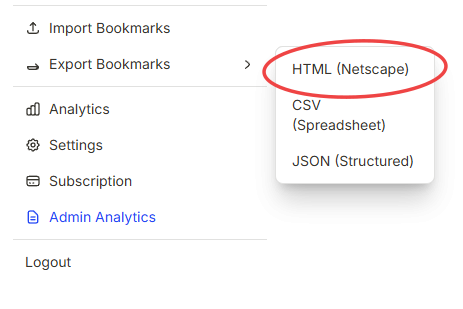
Go to Settings → Export to download your library. You choose the format based on what you're doing with it afterward.
The three formats
- HTML — the standard Netscape bookmark file that every browser and bookmark manager can import.
- CSV — a spreadsheet-friendly list, good for analysis or migrating into another tool.
- JSON — Trezio's own full backup format. This is the only format that round-trips cleanly back into Trezio, preserving folders, notes, and media references.
What a JSON backup includes
Every item, with its notes, tags, and folder structure. Media (screenshots, voice notes) is included as a reference to where it's stored, not as embedded file bytes — restoring re-links to the same files rather than duplicating them.
What is never exported
Restoring a backup
Import a JSON backup the same way you'd import from another bookmark manager (Settings → Import). Each item restores independently, so a partial or interrupted restore doesn't lose everything — and re-importing the same backup twice doesn't create duplicates.