Auto-lock
Two separate auto-lock systems — one fixed, one you can configure — for two separate things.
Trezio has two separate auto-lock systems, matching the two separate locks described in "What the Vault is." They aren't configured in the same place, and mixing them up is an easy mistake to make — so here's exactly how each one works.
Encrypted credentials: fixed, 30 minutes
Once you unlock access to your encrypted login credentials with your master password, that access doesn't last forever. After 30 minutes without any mouse movement, keyboard input, scrolling, or touch activity, Trezio automatically clears your master password from memory — you'll need to enter it again to view or attach credentials.
Folder vaults: configurable, in Settings
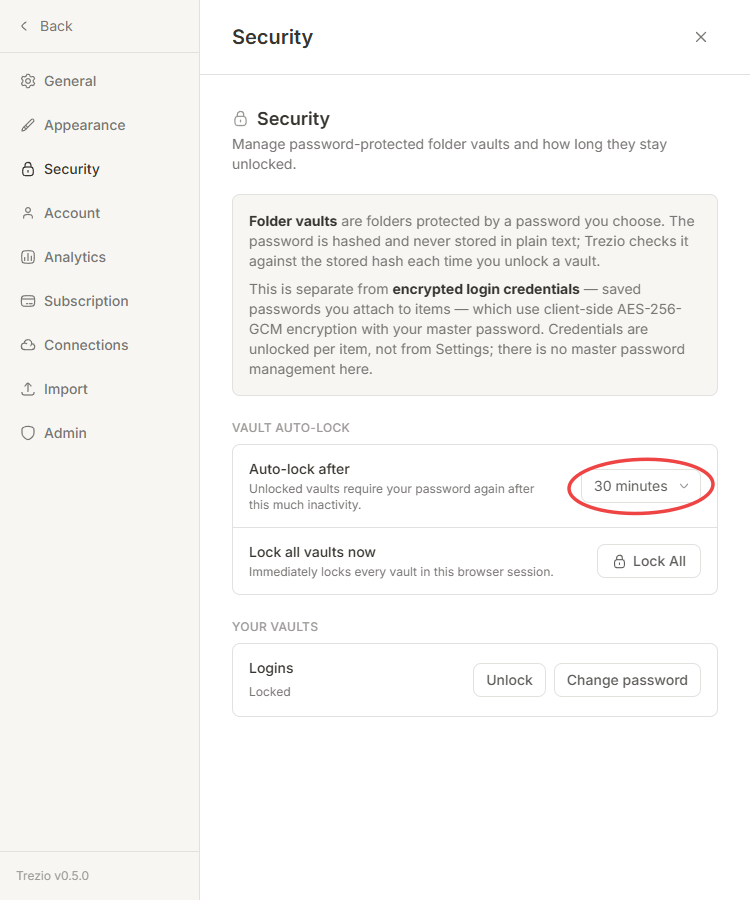
Password-protected folders are a separate feature with their own, separate auto-lock timer that you can actually change. In Settings → Security, "Auto-lock after" lets you pick 1, 5, 15, or 30 minutes, 1 hour, or Never for how long an unlocked vault folder stays unlocked before it needs its password again. "Lock all vaults now" locks every folder vault in your current browser session immediately, no waiting required.
The browser extension locks separately
The extension keeps its own credential-unlock state, independent of the web app or mobile app. Unlocking credentials in one doesn't unlock them in the others — each locks and times out on its own.